


A slow website costs you enquiries before anyone reads a word. Google’s research on mobile pages found that when load time goes from 1 second to 5, the chance of a visitor leaving rises by 90%. That’s a lot of lost leads for a few extra seconds. Speed matters for search too, though less than people think. Core Web Vitals are one of Google’s page-experience signals. They won’t push a weak page above a more relevant one, but when two pages are close, the faster one usually comes out ahead. This is a practical guide to website speed optimization in Dubai: what tends to slow UAE sites down, what to fix first on WordPress and Drupal, and the numbers worth aiming for.
We build fast websites as a default, not an add-on. Here is what that actually involves.
Why UAE Websites Are Often Slow
The usual causes apply everywhere, but a few come up again and again on UAE sites:
● Hosting far from your visitors. If your server sits in Europe or the US, every request from Dubai has to travel there and back. A page needs several of those trips before anything appears.
● Too many marketing tags. Meta Pixel, Google Ads tracking, LinkedIn Insight Tag, HubSpot, a live chat widget. Each one is more JavaScript for the visitor’s phone to download and run.
● Huge images. Hero photos often go straight from the photographer to the website, still several megabytes and at full resolution.
● Plugins and modules nobody uses. A WordPress site with dozens of plugins, or a Drupal site carrying old modules, loads extra code on every page
Free Audit
Find out what's holding your business back.
Our specialists will review your digital presence — no cost, no commitment.
Book a Free Call ↗Website Speed Optimization Checklist
You don’t have to do everything at once. Start with hosting and images, which usually give the biggest gains, then work your way down.

Hosting and Infrastructure
- Host close to your visitors: AWS Middle East (UAE), Microsoft Azure UAE North or Google Cloud’s Middle East regions. Or put a CDN with a UAE edge location, such as Cloudflare, in front of your site.
- Turn on GZIP or Brotli compression.
- Use full-page caching: WP Rocket or LiteSpeed Cache on WordPress, or Drupal’s builtin page caches.
- Aim for a Time to First Byte (TTFB) under 600 ms for visitors in the UAE.
Images
- Convert images to WebP. Google puts WebP at 25–34% smaller than a comparable JPEG, and AVIF can go further.
- Don’t lazy-load the hero image. It’s usually the Largest Contentful Paint (LCP) element, so load it straight away and give it fetchpriority=”high” .
- Do lazy-load the images further down the page.
- Serve images at the size they’re shown. A 1920px photo squeezed onto a phone screen still downloads at 1920px.
- Use responsive images ( srcset ) so phones get smaller files.
- Deliver images through a CDN such as Cloudflare Images or Cloudinary.
- Set a width and height on every image so the layout doesn’t jump while the page loads CLS).
JavaScript and CSS
- Defer any JavaScript that doesn’t need to run before the page is visible.
- Go through your third-party scripts and remove the ones nobody looks at anymore.
- Load chat widgets and non-essential tags only once the visitor starts interacting with the page.
- Break up long JavaScript tasks so the page reacts quickly to taps and clicks (INP).
- Minify your CSS and JavaScript.
- Remove unused CSS. On theme-heavy sites, a large share of the stylesheet often goes unused.
- Inline the critical CSS so the first screen can appear without waiting for the full stylesheet.
WordPress-Specific
- Review your plugins and remove anything inactive or doing the same job as another. Each active plugin can add database queries and scripts.
- Use object caching (Redis or Memcached) if the site gets a lot of traffic.
- Switch off the emoji script that WordPress loads on every page by default.
- Limit post revisions so the database doesn’t fill up with old drafts.
Drupal-Specific
● Keep Internal Page Cache, Dynamic Page Cache and BigPipe switched on.
● Turn on CSS and JavaScript aggregation under Performance settings.
● Use Redis or Memcache as the cache backend on busy sites.
● Put Varnish or a CDN in front of anonymous traffic.
● Set up responsive image styles that output WebP.
● Uninstall contributed modules you no longer use
Still on an older Drupal version? See our Drupal development services, or read What Is Drupal? for the basics.
What Speed Targets Should a UAE Website Hit?
Google counts a page as “good” when at least 75% of real visits meet these thresholds:
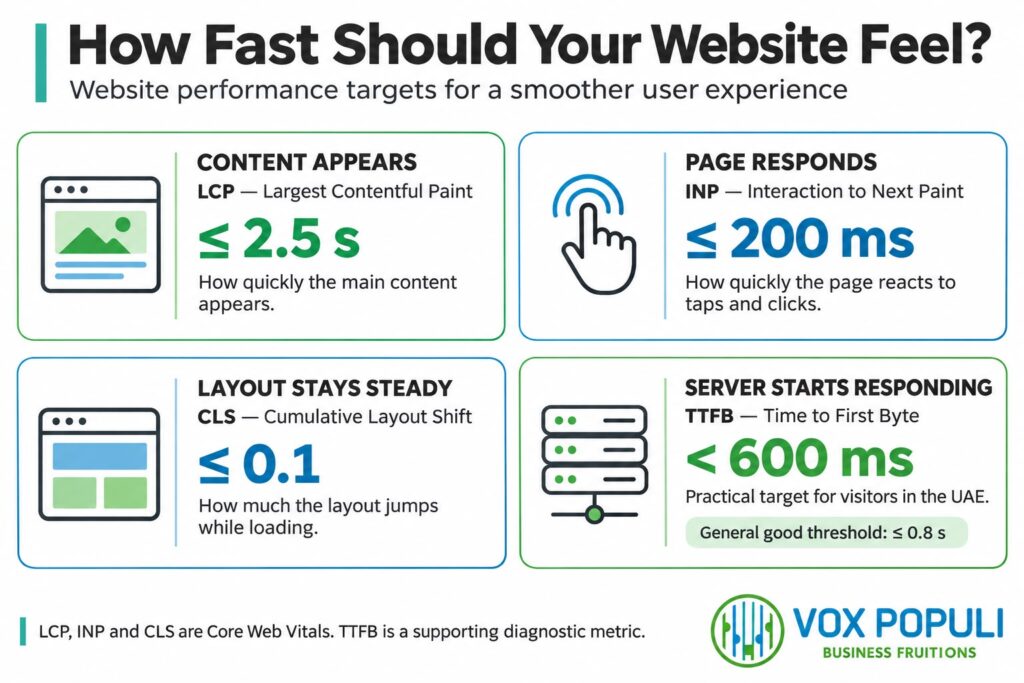
PageSpeed Insights also gives a lab score out of 100. Aiming for 85+ on mobile and 95+ on desktop is a sensible build target, but Google ranks on what real visitors experience, not on the lab score. Treat Core Web Vitals as part of your technical SEO and fix them alongside crawl and indexing issues.
How to Check Your Website’s Speed
All of these are free:
● PageSpeed Insights shows real-visitor data (once your site has enough traffic) and lists what to fix.
● Google Search Console → Core Web Vitals shows which groups of pages fail on mobile and desktop.
● Lighthouse in Chrome DevTools is handy for testing changes before they go live.
● Test from the region. Run tests from a Middle East location, not only from the US or Europe.
Start with mobile. And don’t stop at the homepage: test a service page, a blog post and your contact page too, because each template can behave differently
FrequentlyAsked Questions
Does website speed affect Google rankings?
Yes, but only a little. Core Web Vitals are a ranking signal, while relevance and content quality count for more. Where speed really pays off is in how many visitors stay long enough to get in touch.
What is a good load time for a UAE website?
On mobile, your main content should appear within 2.5 seconds, and your server should start responding in under 600 ms for visitors in the UAE.
Do I need to host my website in the UAE?
Not always. A CDN with a UAE edge location can serve cached pages from close to your visitors. Local hosting matters most for pages that can’t be cached, such as logged-in areas and checkouts. Can a slow website be fixed without a rebuild?
Usually, yes. Better hosting, caching, lighter images and fewer scripts solve most problems. A rebuild is only worth it when the theme or platform itself is holding the site back.
Get a Speed Audit for Your Website
If your site feels slow, our web development team can run a developer-led website speed optimization audit. We’ll find what’s holding it back and fix it, whether the site runs on WordPress, Drupal or Custom Code.